




Neon now supports a new permission structure, with four org-level roles (Admin, Editor, Viewer, and Collaborator) and per-project permissions that let you control exactly which projects your agents and collaborators can access.
Until now, anyone invited to a Neon org was assigned a single role that applied uniformly across every project in the org, with no way to scope access to individual projects. That's fine for small teams, but it breaks when agents are spinning up and managing databases at scale. The new structure lets you grant agents scoped credentials per project to avoid over-permissioned keys.
The new permission structure: grant access project by project
Neon's access model now works in two layers: org-level roles that define a user's baseline access across the organization, and project-level permissions that can expand that access on specific projects.
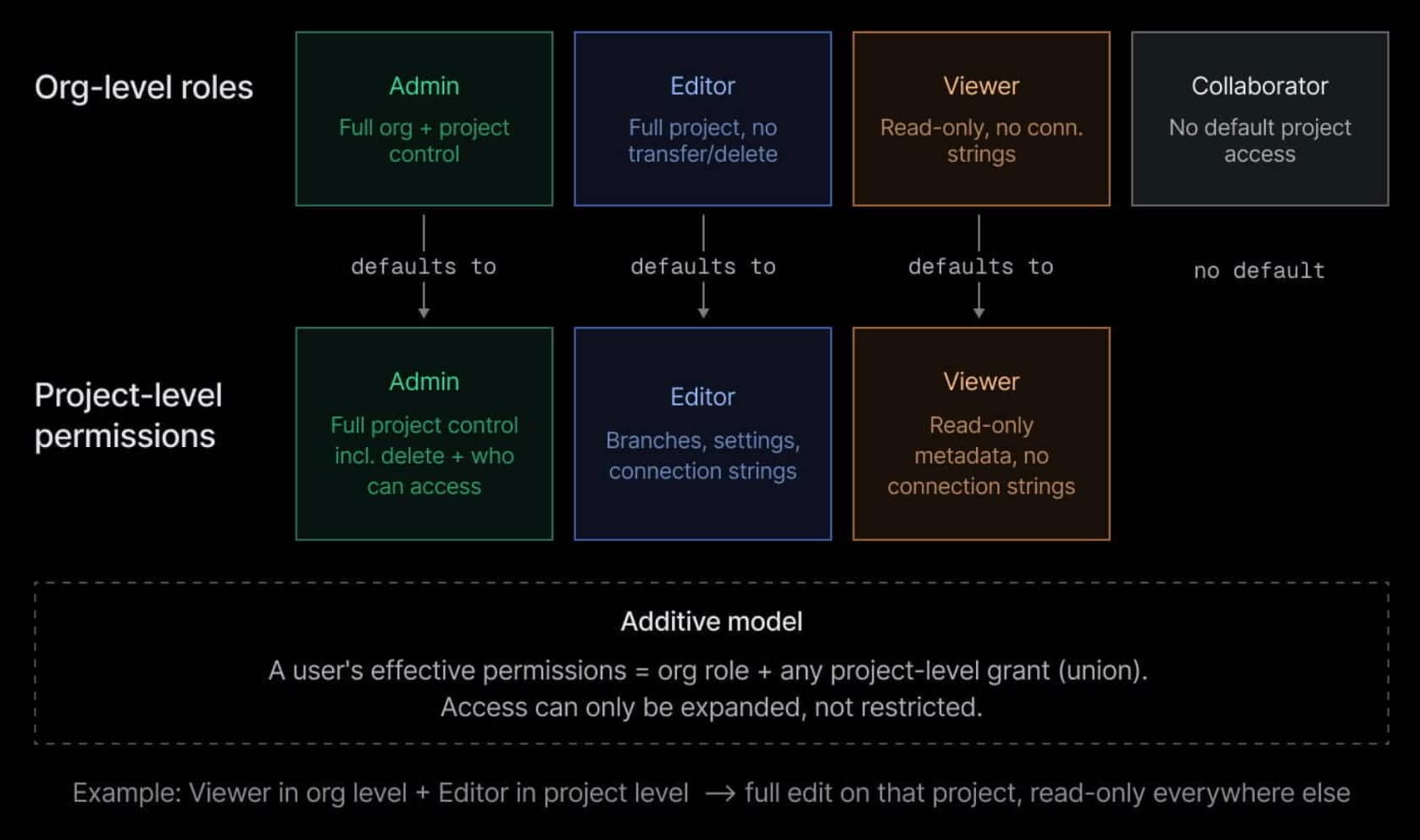
Org-level roles
Every user in a Neon org is assigned one of four roles:
- Admin: has full control over the org and every project in it, including billing and user management
- Editor: has full access to all projects except the ability to transfer or delete them
- Viewer: has read-only access to org settings and project metadata. Viewers cannot see connection strings
- Collaborator: has no default access to org settings or projects. Collaborators can be granted specific project-level permissions on individual projects. This is the right role for external contributors or agents that should only ever see what they're explicitly given
Project-level permissions
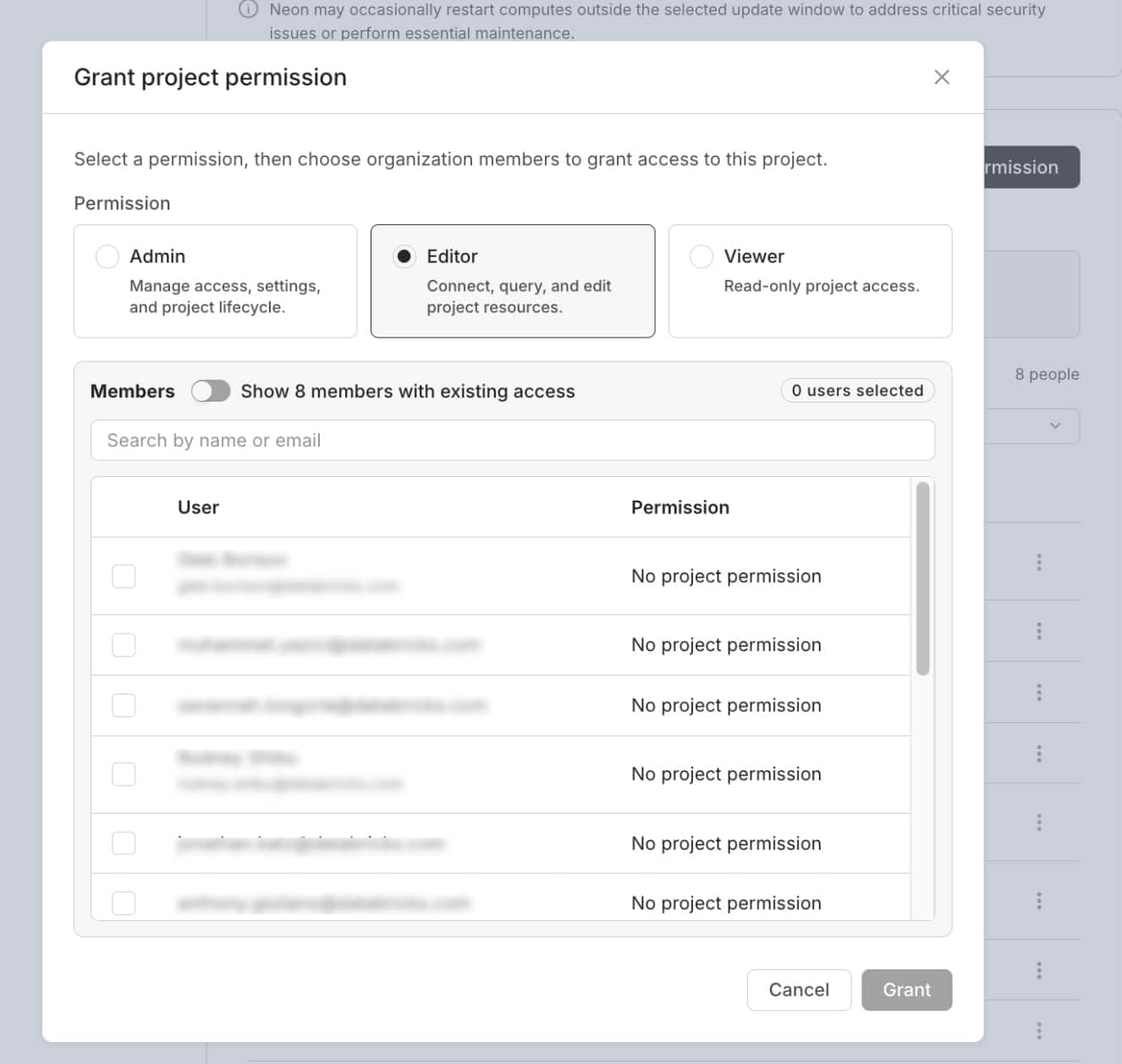
On top of the org role baseline, you can grant any user one of three project-level permissions on a specific project:
- Admin: gives full project control, including who can access it and the ability to delete it
- Editor: gives full edit access, including branches, settings, connection strings, and integrations. Cannot transfer or delete the project
- Viewer: gives read-only access to project metadata and settings, not to connection strings
How they work together
These two layers are additive: a user's effective permissions on any project are the union of their org role and any project-level grant. For example, a Viewer granted Editor rights on a specific project can edit that project fully, while remaining read-only everywhere else in the org.
Limiting access coming soon
For now, project-level permissions can only expand access above the org role baseline. There is no mechanism yet to block an Editor from a specific project (it's on our roadmap).
Agents can now manage projects at scale with the right level of access
For all the organizations running agents at scale on Neon, this kind of scoped, per-project access control improves safety management drastically.
- An orchestrator agent can spin up a new Neon project for each PR, customer environment, test run, etc. Large organizations have thousands of projects running in parallel
- Each worker agent can now come provisioned with a scoped credential: Editor on the projects it needs to write to, Viewer on the ones it only needs to read, and so on
- A monitoring agent gets Viewer access across all projects. Enough to observe and report, but no ability to modify anything
- If a worker agent is compromised or misbehaves, the blast radius is a single project, not the entire org
Also simplifies developer-to-developer collaboration
This new permission structure is not only useful for agents but also for developer collaboration. Neon's free plan includes 100 projects, but until now, org-level-only permissions meant that anyone you invited got the same role applied across every one of them, making it less practical to bring collaborators into a multi-project setup without giving them more access than you'd want.
With this release, you can give freelancers access to specific projects, invite external developers without exposing your full org, or if you run an agency, manage dozens of client environments under one free account and keep every client scoped to their own project.
Get started
For current Neon users, nothing changes: every user will retain their current access level automatically. But note that the existing project collaboration functionality will be deprecated. If your team relies on project sharing today, the new Collaborator org role plus project-level permissions should cleanly replace it.
Ready to get started? Tell your agents to spin up on Neon:
npm create neon@latestOr sign up for the free plan and start building.
Coming soon to the Vercel Managed Integration
We still haven't rolled out this new permission structure to organizations deployed via the Vercel Managed Integration, but it'll be a matter of days. Stay tuned.